Friday, 15 November 2013

Plan for Origin Magazine

This week I have been planning the layout of Origin magazine. It took some time as I had to think about where I would want to place images and text for the front cover, contents page and double page spread.


Front Cover 


Contents Page


Double Page Spread

There may be a few changes to the plan when I start to make Origin magazine next week.

Thursday, 14 November 2013

CMYK for Origin Magazine Colour Scheme


I thought finding the CMYK for Origin magazine colour scheme (grey, yellow and black) would be useful as it would be easier to find the colour I want when I start producing the magazine on PhotoShop and InDesign. I thought that this would be a common problem for me during making the magazine as I would forget the specific shade I would need.
I will now use the CMYK code for the colours to finalise my masthead of Origin magazine. 

Wednesday, 13 November 2013

Photography Call Sheet 1

This week I have been trying to organise photo shoots for Origin magazine. I have been looking for potential models who would be great for Origin magazine. I have finally got my main cover star model ready. My first shoot is tomorrow from 11:40am. 


I hope everything goes to plan and that the photos come out as I imagined it.

Thursday, 7 November 2013

Audience Feedback on Origin Magazine Proposal

Illustrator Induction

Today I had an Illustrator induction on how to use the software to create mastheads and titles for my music magazine.

The outcome of exploring Illustrator

I used the type tool to type 'Origin'. To get the black and yellow outline I used the stroke tool and I could increase the stroke to a higher pt. I used the colours yellow, black and grey as this is my colour scheme for Origin magazine. I then was able to use the type tool to type 'contents' and right clicked the text to 'create outlines' this allowed me to move the text closer to each other.  I then used the brushes tool and started searching for interesting things and ended up using the border around Origin and then I was able to use the border as a paint brush tool to draw and write something. 
Illustrator is not as hard as I thought it would be, it is just like Photoshop and InDesign.

Monday, 4 November 2013

Photography Induction

In today's lesson I had a photography induction in the studio. 
These are the points i had during the session...

  • There are only white, black and grey backgrounds for the photos.
  • There is a trinity flash light for different lighting mechanisms.
  • There is a soft box, used to soften the lights (diffuses) creating no shadows.
  • Soft boxes has numbers for how strong the flash will be (1.0 is the lowest and 6.0 is the highest number)
  • There is a reflector (in gold (creates a warm tone), silver (creates harsher tones)).
  • Always make sure the room lights are off so the focus can be on the model.
  • The camera would be a Nikon D7000 - always look through the view finder.
  • On the camera there is a god ox (acts as remote control) it connects to the trinity flash lights and soft boxes.
  • Use the lens on the camera to zoom in or zoom out.
  • Hold the camera button to keep image in focus.
  • There are 2 options on the camera A for Aperture which is used for detailed photos and S stands for Shutter Speed used for fast movement photos.
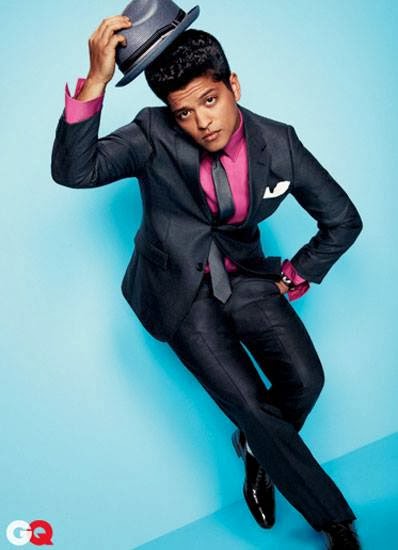
I have two photos that I would like to use as inspiration for my main cover star and double page spread. I haven't thought of any photos for the contents page yet.

Front Cover image inspiration

I like the pose and props used in this image of Usher (hat and leather jacket). My cover star is most likely to be a male.
Double Page Spread image inspiration
I like the pose of Bruno Mars in this picture. I would consider this pose for my double page spread.